Skip to content
English
  • There are no suggestions because the search field is empty.

Add Builder Prime App to Your Dock (Safari)

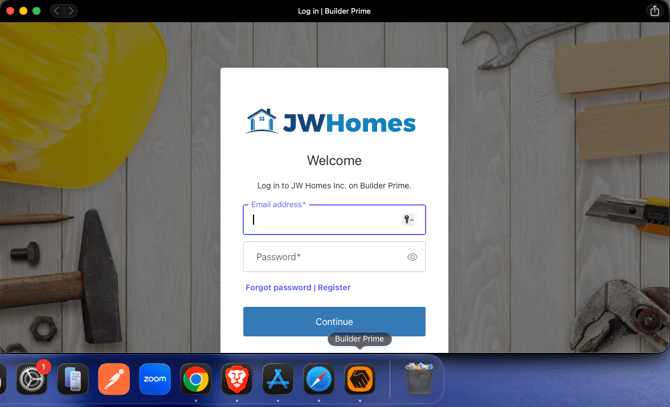
You have the option to add any website to your dock so it behaves like an app on your computer. This method hides the URL from view and allows it to be used similarly to a native app.


  1. Open Safari and go to the website.
    Screenshot 2026-02-20 at 9.58.04 a.m.

  2. Click File > Add to Dock or the Share button > Add to Dock.
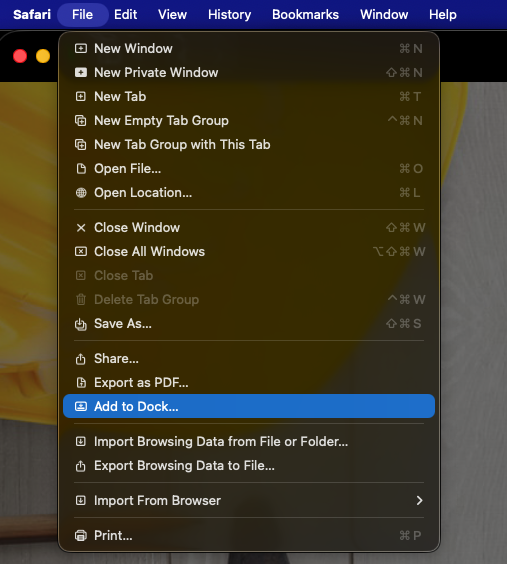
    Screenshot 2026-02-20 at 9.58.53 a.m.

  3. Finally you will be prompted to name it and finally add it
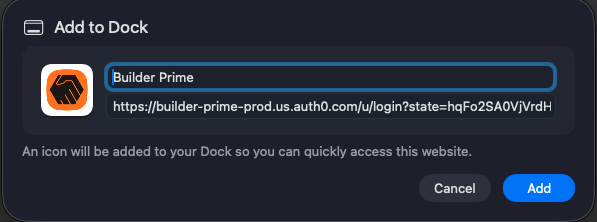
    Screenshot 2026-02-20 at 9.59.32 a.m.
  4. Name the app and click Add. Then it will appear in your Dock and run in its own window (no URLs).Screenshot 2026-02-20 at 10.01.18 a.m.